Hybrid Contact Center Modernization Can Start Before the Full Migration

Key Takeaways
- Avaya Call Center Elite customers can continue established voice routing while Avaya Infinity adds capabilities around the agent experience, customer workflows and new interaction channels.
- Hybrid modernization can begin with a specific agent population or customer journey, giving organizations a practical way to introduce Avaya Infinity before every workload has moved.
For years, hybrid was often discussed as the middle of a migration. An organization would run cloud and on-premises technology together for a period of time, and eventually complete the move to the cloud.
From a product perspective, I think the more useful way to look at hybrid is as an architecture that lets modernization begin before every CC Elite workload has moved.
In practice, hybrid contact center modernization lets CC Elite continue running established routing and reporting while Avaya Infinity introduces new customer and agent experiences around that foundation.
A mature Avaya Call Center Elite (CC Elite) deployment may contain years of routing logic, Avaya Experience Portal applications, Call Management System reporting, and integrations with business systems. Those components can be deeply embedded in daily contact center operations.
A hybrid deployment of Avaya Infinity allows those established components to remain part of the operating environment as new agent, workflow, and digital capabilities are introduced around them.
CrayonIQ recently reinforced this view in its 2026 buyer’s guide, describing Avaya as a “Hybrid Stalwart” and characterizing hybrid architecture as a deliberate operating model for organizations that need control over parts of their environment.
How Avaya Infinity Fits into an Existing CC Elite Environment
A mature CC Elite environment may already have proven routing, self-service, reporting, and business integrations supporting live customer traffic. Adding Avaya Infinity gives organizations a way to bring in a modern agent workspace, workflow orchestration, and digital engagement while those established components continue doing their jobs.
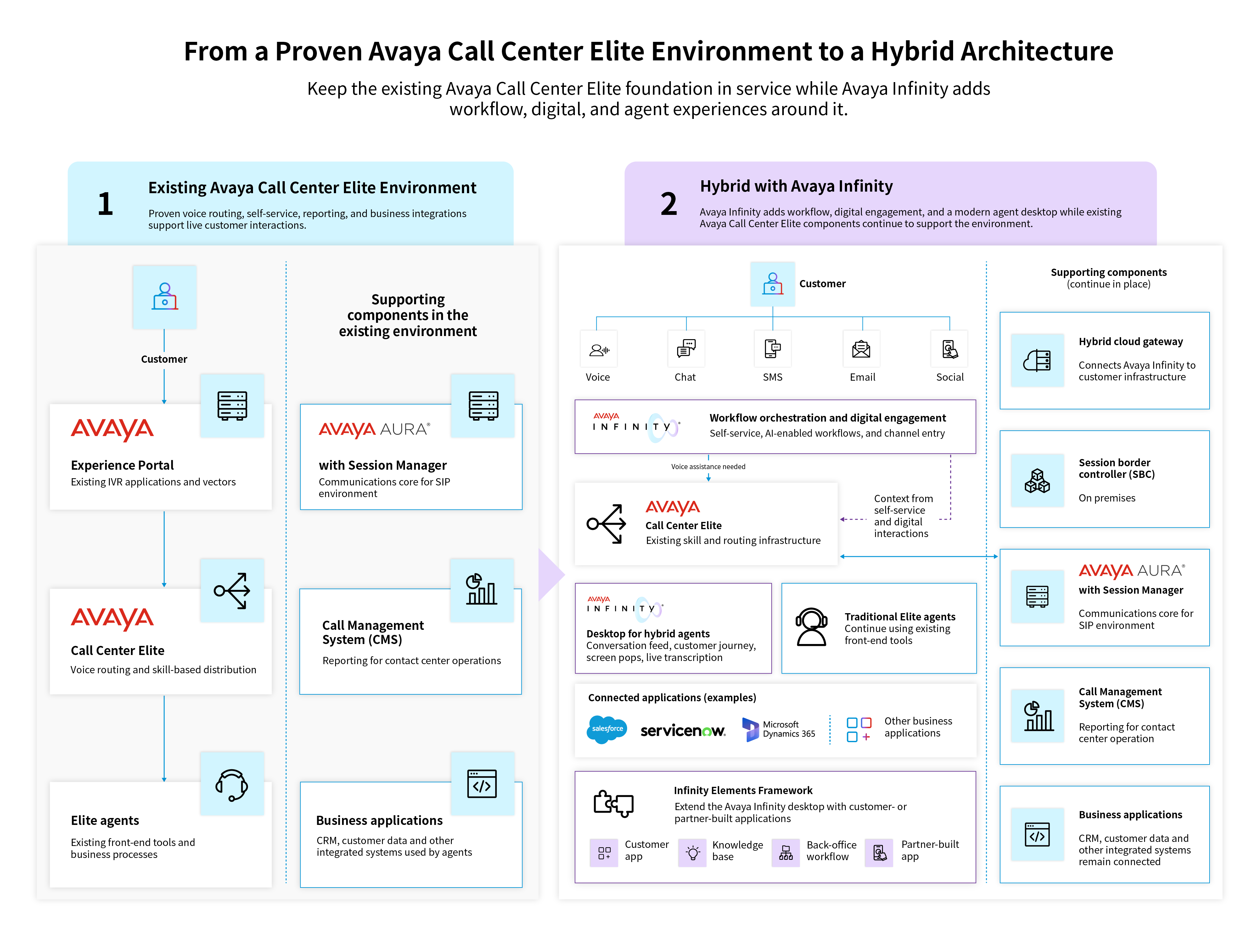
The value of adding Avaya Infinity is that modernization can begin where customers and agents will feel it first. Self-service can become easier to change, agents can work in a richer desktop with more context, and digital interactions can be introduced while proven CC Elite routing and integrations remain in service.
On the technical side, the hybrid cloud gateway connects the Avaya Infinity environment back to the customer’s infrastructure. Signaling reaches the session border controller on premises and continues into the SIP environment used for station and agent registration.
“The agent experience can change while CC Elite remains responsible for the voice routing underneath it.”
Follow a Call from Avaya Infinity Workflow to a CC Elite Skill
Consider a banking customer who starts in self-service. They ask for their checking and savings balances, then ask which bill payments are scheduled. The customer decides to make one of those payments and, before leaving self-service, asks about current certificate of deposit rates. Avaya Infinity workflow is handling the conversation and the actions associated with it up to this point.
Then the customer asks for an agent.
The call transfers into an existing Elite skill. CC Elite makes the routing decision and delivers the interaction to an available agent. The voice routing is still happening through the established Elite environment, while the receiving agent can work in the Avaya Infinity desktop.
Avaya Infinity workflow → Elite skill → Avaya Infinity desktop
When the call lands, the Avaya Infinity desktop can give the agent a view of what happened before the transfer. The conversation feed shows the interaction history, while the customer journey shows earlier activity. Screen pops can surface information from connected business applications, and Elite interaction information can be passed into Avaya Infinity for use in the workspace. Live transcription can capture both sides of the hybrid voice interaction as the conversation continues.
Move Selected CC Elite Agents to the Avaya Infinity Desktop
Consider a contact center with different teams supporting distinct lines of business. One team may spend much of every interaction moving among customer records, internal tools, and contact center applications. That group can begin using the Avaya Infinity desktop while other CC Elite agents continue with their existing front-end applications and business processes on the same underlying contact center infrastructure.
The workspace can also be extended through the Infinity Elements Framework. If an agent relies on a customer or partner-built application during the call, that functionality can be brought into the Avaya Infinity desktop with context from the active interaction. An application that currently sits outside the agent workspace does not automatically have to disappear as part of desktop modernization. The organization can decide how that function should surface in the new experience and build the extension around the process the agent already performs.
Move Selected Self-Service Flows into Avaya Infinity Workflow
An Avaya Experience Portal application that is working well can keep running while a self-service flow that needs a different experience moves into Avaya Infinity workflow. This makes the individual flow, rather than the entire IVR estate, a practical unit of modernization.
For example, a stable flow can remain in production while another journey moves first because it needs easier workflow changes or tighter integration with what happens after the customer requests an agent.
When self-service reaches the point where a person is needed, the Avaya Infinity workflow can transfer the interaction into the hybrid environment with context gathered earlier in the journey. CC Elite then routes the voice interaction to the appropriate skill.
Add Avaya Infinity Digital Channels Alongside CC Elite Voice
A customer service team can add chat, SMS, email or social messaging through Avaya Infinity while established voice traffic continues through CC Elite.
The agent population can evolve along with the channels. Traditional Elite agents can continue handling established voice interactions through their existing tools. Hybrid agents can use the Avaya Infinity desktop, and digital agents can work alongside them as new customer journeys come online.
This is one reason the desktop often becomes an early entry point into hybrid modernization. It gives agents a workspace where new interaction types and business information can come together. Other starting points include voice orchestration and CRM-connected workflows. Avaya Infinity workflows can be introduced around front-end or back-end CRM processes while the existing CC Elite routing environment remains in place.
The first production deployment can focus on a real workload while the rest of the CC Elite environment continues carrying customer traffic. As additional workloads are ready, the Avaya Infinity footprint can expand with them.
Want to see how this hybrid model works in practice?
Watch the Avaya Infinity modernization series on demand
FAQs About Hybrid CC Elite Modernization with Avaya Infinity
Can CC Elite and Avaya Infinity run together?
Yes. Avaya Infinity can operate alongside an existing CC Elite environment. CC Elite can continue handling established voice routing while Avaya Infinity introduces capabilities such as the agent desktop, workflow orchestration, and digital engagement.
What can stay in place in a hybrid CC Elite and Avaya Infinity deployment?
CC Elite can continue handling established voice routing. CMS remains part of the environment for CC Elite reporting, while existing Avaya Experience Portal applications, Avaya Aura with Session Manager, and business applications integrated with CC Elite can remain part of the architecture.
Can some CC Elite agents use Avaya Infinity while other agents keep their existing tools?
Yes. Traditional Elite agents and hybrid agents can operate side by side against the same underlying infrastructure. A selected population can begin using the Avaya Infinity desktop while other agents continue working through their existing applications and business processes.
Can an Avaya Infinity workflow transfer a call to a CC Elite skill with context?
Yes. An interaction can begin in an Avaya Infinity workflow and transfer to an existing Elite skill when an agent is required. CC Elite performs the voice-routing decision, while context gathered earlier in the Avaya Infinity workflow can move with the interaction into the agent experience.
Can existing Avaya Experience Portal applications remain in place?
Yes. Existing Avaya Experience Portal applications and vector configurations can continue operating as selected self-service experiences move into Avaya Infinity workflow. This gives teams a way to modernize particular journeys while other established applications remain in production.
Is live transcription available for hybrid agents?
Yes. Live transcription is available for hybrid voice interactions and can transcribe both the customer and agent sides of the conversation.
Can Avaya Infinity digital channels run alongside CC Elite voice?
Yes. Avaya Infinity digital capabilities can operate alongside an existing CC Elite voice environment. Organizations can introduce digital interactions such as chat, SMS, email and social messaging while established voice traffic continues through CC Elite.